
How iOS 16 Could Impact Your SMS Marketing—and How to Prepare

Key takeaways

Paid media is essential for fast growth and visibility in today’s competitive digital marketing world, giving businesses better targeting and measurable results. The best paid media agencies use technology, custom strategies, and transparent reporting to drive real business growth, with Hunter Digital leading through a data-driven and client-focused approach.

Key points:

  • Paid media allows brands to reach the right audience quickly with targeted and testable campaigns.
  • Top agencies blend creative work & media buying, access exclusive ad features, & use proprietary analytics to get measurable results.
  • Industry specialization helps agencies deliver more effective strategies faster by understanding unique client needs.
  • Clear communication, customized planning, frequent reporting, and ongoing optimization are must-haves for successful partnerships.
  • Hunter Digital stands out with its real-time data, multichannel expertise, and relentless focus on performance and transparency.

Topic

Key Insight

Why It Matters

Action Items

Paid Media Importance

Accelerates growth and delivers measurable marketing results.

Accelerates growth and delivers measurable marketing results.

Accelerates growth and delivers measurable marketing results.

Agency Specialization

Agencies with industry experience customize strategies for better outcomes.

Not all campaigns or industries are the same.

Choose an agency with direct experience in your sector.

Core Capabilities

Top agencies blend creative, data, platform access, and transparency.

These factors separate leading agencies from the rest.

Look for agencies with these strengths when vetting firms.

Hunter Digital Approach

Uses proprietary analytics, ongoing optimization, and open reporting for growth-focused work.

Provides transparent, results-driven marketing partnerships.

Prioritize agencies offering data-driven, honest service.

Evaluating Agencies

Asking about customization, reporting, team, & past success reveals agency fit.

Ensures you hire a truly effective marketing partner.

Always ask key questions to assess agency capability.

Why Paid Media Is the Backbone of Modern Digital Marketing

Paid media is now the core engine behind fast growth and visibility for brands. Whether your business is new or already established, digital marketing is too competitive to rely on organic progress alone. Paid media lets you put your brand in front of the right people, on the right platforms, at the right time.

Here’s the simple truth: Companies investing in paid media see faster results. You can target specific audiences, test and scale creative ideas, and get new customers—all with measurable results. As a digital marketing agency, we’ve watched businesses double or triple their revenue after launching campaigns built on data and performance. No guesswork. Just proof that paid media works.

What Makes an Agency One of the Best Paid Media Agencies

Top paid media agencies do more than run ads. They combine technology, creativity, and proven strategy to build lasting growth for their clients. The best agencies know how to match digital marketing tactics to each client’s goals and industry.

Why does that matter? Because not every campaign or client is alike. An eCommerce clothing brand needs something different from a B2B SaaS company. The best paid media agencies understand this—they customize everything, from ad copy to budget splits, based on your business.

From my experience at Hunter Digital, successful paid media comes down to six main strengths:

  • Integrated creative and media buying—so your ads not only look good, they actually convert.
  • Access to beta ad features and exclusive partnerships with Google, Meta, TikTok, Pinterest, and more.
  • Proprietary analytics platforms for real-time insights and quick pivots when results change.
  • A proven track record of real, measurable ROI.
  • Custom strategies for each industry.
  • Transparent reporting and reliable communication.

Agencies praised on industry lists—like these top-rated paid media shops—all share those traits.

Categories of Paid Media Agencies and Why Specialization Matters

Answer first: Not all paid media agencies offer the same thing, & choosing one with experience in your industry can cut your learning curve in half.

Specializations you’ll find in the market:

  • Enterprise and Fortune 500: Focus on complex, cross-channel buys and advanced analytics. Key for big budgets and global brands.
  • SaaS and Performance Marketing: Optimize long sales cycles, lead generation, and audience nurturing with laser-targeted search engine marketing and multi-step retargeting.
  • eCommerce and Direct Response: Maximize every ad dollar to boost sales, lower CPA, and unlock paid social and Google Shopping tactics.
  • Creator Campaigns: Pair brands with trusted influencers, perfect for Gen Z and those who want authenticity at scale.

At Hunter Digital, we’ve worked with clients across these categories. But no matter the industry, our approach is always data-first and growth-focused. If the numbers aren’t moving up, we’re not finished.

Soon, iPhone users will have more options for filtering text messages. Encouraging subscribers to save your contact card can help you stay in their main SMS inbox. 

As you’ve probably already heard, Apple recently announced their newest operating system update, iOS 16. While the last few iOS updates have been heavily centered on data privacy, iOS 16 includes many new features focused on personalization that “change the way users experience iPhone.” 

Consumers have become more protective and discerning with how they interact with brands and what data they feel comfortable sharing. Apple has been taking note of this, as we saw with the previous updates around App Tracking Transparency and Hide My Email. These moves are great for consumers, but they impact the way we market, and make it more difficult to be seen. 

iOS 16’s enhanced personalization features seem to be an extension of these consumer privacy needs, giving iPhone users even more control over how they use their device. 

As a marketer—especially if you manage your brand’s SMS marketing channel—there’s one feature you need to be aware of before Apple releases iOS 16 to the public in September: the ability to filter text messages based on transactions, promotions, and junk. Here’s what you need to know to prepare now.

More options for filtering text messages

Currently, iPhone users can filter text messages from unknown senders—those who aren’t saved in their contacts—into a separate list. To do this, they need to toggle on this feature, meaning it’s not the default Messages setting.

With iOS 16, users will have more options for filtering text messages. Similar to Gmail’s “Promotions” tab, Apple is introducing new categories and subcategories for content filtering, including Transactions, Promotions, and Junk.

There’s one catch. Right now, Apple’s SMS filter is only available to users in Brazil and India. They haven’t indicated when they’ll expand this to more countries. Instead, Apple is letting developers build third-party filtering apps based on their API—meaning iPhone users will need to download a third-party app if they want to filter their texts based on these new categories and subcategories.  

Encourage subscribers to save your contact card

While we’re unsure of how many iPhone users will want these new filtering options—especially if they have to download an app—they’re still able to filter text messages from unknown senders. 

If you want your text messages to land in your subscribers’ main SMS inbox, we recommend sending them your contact card (which contains your brand’s name, logo, and more), and encouraging them to save you as a contact in their phone. Once subscribers have added you as a contact, you can send them more types of MMS content, such as video messages. 
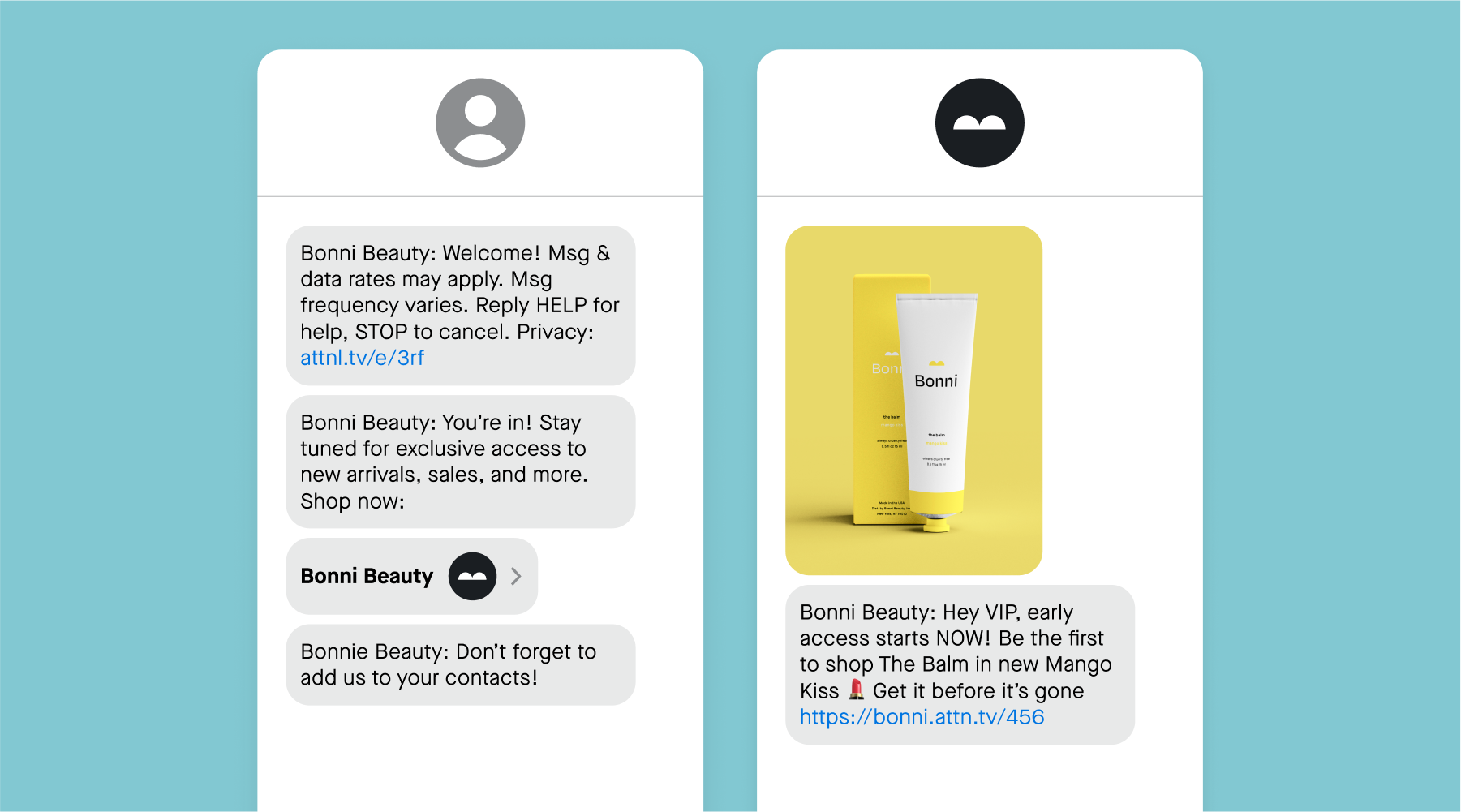
example of text messaging contact card

In addition to making sure your texts get seen by your most loyal subscribers, contact cards help increase brand recognition and engagement by making your messages feel more personalized. Instead of seeing your short code or toll-free number, subscribers will see the name of your brand and your logo every time you send them a message. On average, this leads to lower SMS opt-out rates, too.

Consider these benefits as Apple redesigned how notifications will appear on the Lock Screen in iOS 16. They’ll roll in from the bottom of the screen, and users can choose to view them in an expanded, stacked, or count view. Your text message will likely be much more effective if a subscriber sees your brand name and logo appear in these notifications, instead of an unrecognized phone number. 

Best practices for sending your contact card

Creating and sending your contact card is easy. You’ll need a few things to activate this in your Attentive settings:

  • Contact Display Name (required)
  • Contact image (required)
  • Company URL (optional)
  • Company email (optional)
  • Company address (optional)

Once you’ve added these details and enabled your contact card in your settings, you can send it to subscribers.

Sending to existing subscribers

No matter the size of your SMS list, it’s never too late to send your contact card to existing subscribers. All you need to do is attach your contact card to a campaign message. Set up your campaign message like you normally would. When you get to the Design step, click the “Add media” button, and choose “Virtual contact card.” 

Another option is adding your contact card to your triggered journeys. One great use case to consider is including it in your Magical Journeys that target VIP segments. Because that audience is already highly engaged with your brand and text messages, they’ll likely want to save you in their phone.

Sending to new subscribers

For new subscribers, we recommend adding your contact card to your welcome series, so they receive it as soon as they sign up for your SMS program. You can easily add this to your Welcome Journey, so new subscribers get the legal message, welcome message, and then your contact card.

If you’d like to add your contact card to a different journey, you’ll just need to add a “Send text message” step to that journey, and select your virtual contact card.

Written by Attentive (Auther: Marissa Sanford)

Link to Original Blog: https://www.attentive.com/blog/ios-16-changes